
After recording more than 3,500 interviews, there's one thing I value above all the gear and gadgets in my studio: time. The conversations I have each week are the heartbeat of my work. But in the early days, what came after those chats often felt like an endurance test.
In 2015, I manually deleted filler words one by one. Words like "you know," "um," or long pauses would steal hours from my schedule. I was trying to make every episode sound clean and polished, but the tools I had made it more complicated than it needed to be.
Now I record around 12 interviews a week, with 200 guests already booked over the next four months. That pace is only sustainable because I've developed a post-production workflow that saves time without compromising quality. Descript is a massive part of that process.
If you're working with audio or video, whether you're a podcaster, content creator, or simply trying to clean up recordings, this tool can make a significant difference.
What Descript Does (And Why I Use It)
Most podcast editing tools still rely on traditional timelines. That works if you're a sound designer. However, if your goal is to move quickly and still produce something that sounds good, Descript offers a different approach to working.
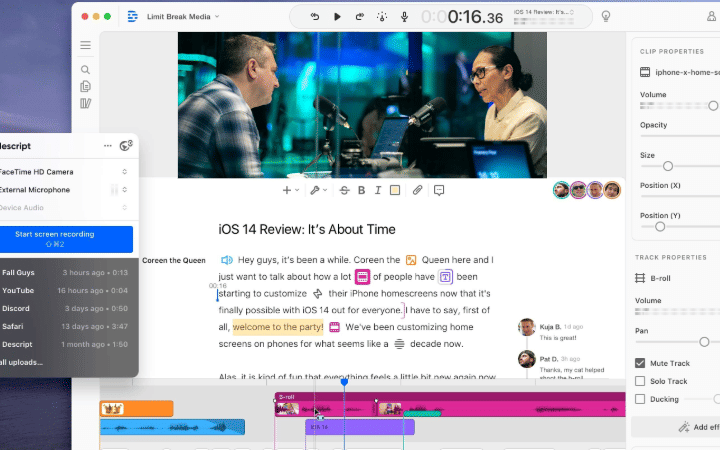
It automatically transcribes your audio and video. Then you edit it like a document. If you want to remove a sentence, you delete the text. If you want to move a quote or section, you copy and paste. It's that straightforward.
The first time I used Descript, I removed every "um," "like," and awkward pause in under five minutes. That same job used to take an entire afternoon. But I have since learned to respect the tool and not remove everything as it overuse can make the conversation unnatural.
If I say something I regret during an interview, I can rerecord the line or use Descript's voice cloning feature to clean it up. I still value authentic recording, but having the option to make quick, invisible fixes has changed how I work.
From Interview to Clip in Minutes
After I finish an interview, I import the recording into Descript. I can highlight the moments that stood out and then use the "Copy Highlights" feature to build a social clip or teaser. In minutes, I have a rough draft ready to go.
Want to turn that episode into a blog post? Same process. The transcript is already there. I pull out the strongest quotes, drop them into a draft, and I'm halfway to publishing.
Studio Sound, another Descript feature, cleans up the audio without needing extra plugins. I'm not working in a soundproof booth, but you wouldn't know that from the final edit.
Why Descript Works for Podcasters
Editing audio used to require a completely different mindset from writing. Descript closes that gap. I work the way I think. I read, write, highlight, and shape stories without needing to learn an audio engineer's workflow.
It also makes collaboration easier. I can send a link to a producer, guest, or client and let them comment or even edit directly. Everything stays versioned and saved in the cloud, eliminating the need for exporting and emailing back and forth.
Underlord, AI, and What's Coming Next
Descript recently introduced a feature called Underlord, which is an AI editing assistant that can automatically generate social clips, add captions, and apply visual effects based on your prompt.
It doesn't just find the clips it also identifies them for you. It also styles them with transitions, captions, and even background music, then outputs them in formats ready for TikTok, Instagram, or YouTube Shorts. I've been testing it quietly. Some results are spot on. Others need refining. But it's learning, and the progress is real.
What's most interesting is how Descript encourages users to talk to Underlord as if it were a creative collaborator. Less command line, more conversation. For a tool like this, that subtle shift makes it easier to use without requiring overthinking of instructions.
Descript in My Podcast Workflow
Descript saves me hours each week across podcast editing, repurposing, and publishing. Whether I'm preparing clips, creating transcripts, or reviewing interviews, I always start there.
It handles transcription and allows me to export in clean, readable formats that seamlessly integrate with the rest of my workflow, whether that's publishing on YouTube or uploading to my podcast host.
For anyone who creates content regularly or works at a high speed, Descript is worth considering.
Here's my affiliate link to Descript. If you're curious to try it, that link helps support my work at no extra cost to you.
Already using Descript? Let me know how you've integrated it into your workflow. If you've found something that works better for your style, I'm always open to learning new things.