Have you ever wrapped up an interview or meeting and thought, What did we say that was good? I've had that moment thousands of times. After conducting more than 3,500 podcast interviews, I've learned that if you don't capture insights as they occur, they often disappear without warning.
That's where Fathom AI comes in. It has become one of the most reliable tools in my podcasting workflow. Not just for recording, but for helping me focus entirely on the person I'm speaking with. No tabs open. No scribbled notes. Just a proper conversation.
If you're still juggling audio files, Google Docs, and mental timestamps to figure out what was said, you're wasting energy. This tool handles that aspect for you.
From Chaos to Clarity, Instantly
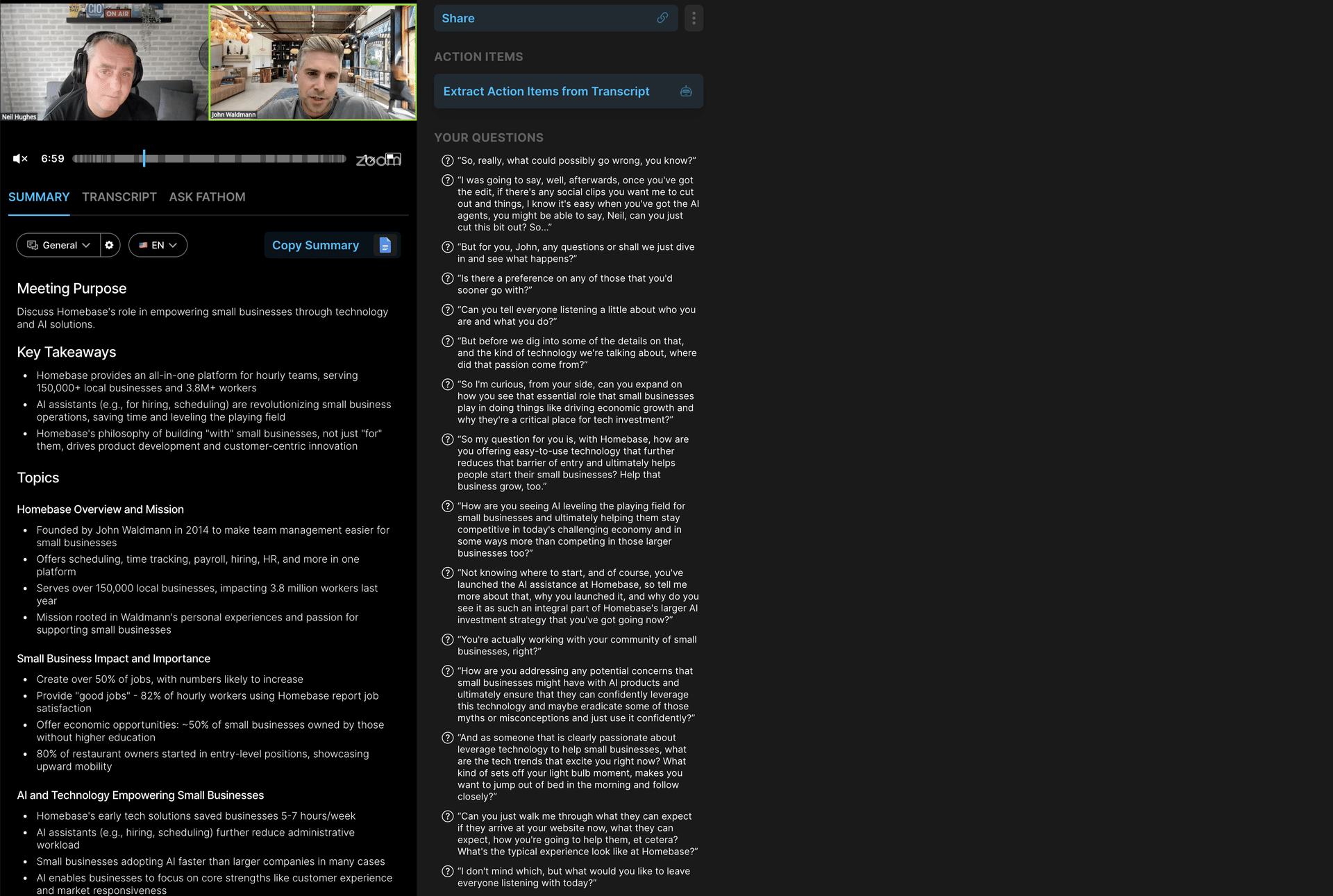
I record every interview on Zoom. While the conversation unfolds, Fathom AI joins silently as a guest. It records the full interview, transcribes it, and generates a written summary by the time I leave the call. I'm offered fifteen different styles of summary, tailored to whatever I need.
Sometimes I'll use one for internal prep. At other times, it helps with writing show notes, newsletters, or social media posts. It's a slight shift in how I work, but the impact is noticeable. What used to take hours now takes minutes.
When I'm ready to pull a memorable quote or moment for LinkedIn or a short-form video, Fathom's search tool makes it simple. I type in a word or phrase, and it shows me exactly where it appears in the transcript. From there, I can clip it, review it, and send it straight to editing.
What Fathom Does (and What It Doesn't)
Fathom captures your meetings on Zoom, Google Meet, or Microsoft Teams. It transcribes the entire conversation in real-time with an accuracy of around 85 to 90 percent and highlights action points and key insights automatically.
It also includes a tool called Ask Fathom. Think of it like a meeting-focused assistant that understands context. You can ask questions about the call, request a summary, or even draft a follow-up message. It's one of the more thoughtful features I've seen in this space.
Fathom also connects to tools like Slack, HubSpot, and Salesforce. So if your workflow spans multiple platforms, it fits in easily. It's not perfect, though. It only works with live meetings. You can't upload a recording and ask it to transcribe after the fact. It also requires that the Fathom bot be invited to the call, which might raise a few eyebrows the first time. That said, once people understand what it does, they rarely question it again.
Why It Works for Podcasters
As a podcaster, time is everything. You can't afford to rewatch every interview. You can't spend hours hunting for clips or quotes. Fathom simplifies that process.
It doesn't replace your judgment or your voice. However, it provides a toolkit that removes friction. It frees you to be fully present with your guest. And it gives you everything you need afterwards to repurpose, reflect, or review.
If you're building a show, scaling your content, or just trying to stay sane during busy weeks, Fathom helps with the heavy lifting.
A Few Things to Know Before You Try It
The free version gives you unlimited meetings, transcripts, and summaries. You can test the workflow without committing to a subscription.
It doesn't work retroactively. It has to be in the meeting to capture it.
There are privacy settings built in, but like any tool that records conversations, you'll want to understand how it handles data. You can read Fathom's policies here.
I've tested similar platforms, and I'll be sharing comparisons with tools like MeetGeek, Otter.ai, and Fireflies in a future post. But Fathom remains the one I come back to, week after week.
Final Thoughts
Fathom AI isn't just a notetaker. It's a quiet assistant that keeps your meetings organised, your interviews searchable, and your ideas easier to act on.
If you're curious to try it yourself, here's my affiliate link to Fathom. It costs you nothing extra, but it helps support my work if you decide it's a fit.
Have you tried any AI meeting assistants? I'd love to hear what's worked (or hasn't) for you. Let me know your thoughts. I'll be sharing more behind-the-scenes tools from my podcasting setup soon.